Towards future-safe emacs.d
Making Emacs configurations maintainable with eldev, straight.el, and structured init/lib/config files—achieving fast startup whilst enabling proper byte compilation, linting with elisp-lint, and testing with buttercup.
TL;DR: This post describes an approach to make the byte compiler and various linters happy and useful in your .emacs.d, whilst maintaining startup performance, the ability to write embedded packages, and test them. This is going to be a long post, so grab a bottle of wine, some snacks, and follow me. In case you lack these things, just take a look at the results.
The longest project in my life is environment, which started with Emacs configurations - a personal frustration and my biggest time waster investment. I might be masochistic, but I've never felt sorry for falling into this trap world. And boy, sometimes it's painful to maintain something in this ever-mutating and dynamic system.
There are various tools to help maintain Emacs packages, all of which fall into one of four categories: project management tools (e.g. Cask, doublep/eldev, alphapapa/makem.sh), compilers (e.g. the built-in byte compiler), linters (e.g. purcell/package-lint, mattiase/relint, gonewest818/elisp-lint, emacs-elsa/Elsa), and test frameworks (e.g. ERT, jorgenschaefer/emacs-buttercup). The tricky part comes when you want to use them for maintaining your own Emacs configurations, as they have different requirements compared to regular Emacs packages. At least in my case, they do.
First, I want Emacs to start as quickly as possible (e.g. in less than a second), meaning that I need to use tools like use-package for deferred loading. So I can't require most packages directly, except those used in the bootstrapping process. This easily makes the compiler sad.
Secondly, I have lots of additional functions extending or combining the functionality of one or more packages. But I hate defining them inside the use-package macro. Aside from aesthetics, I want to retain the functionality of xref-find-definitions. Having definitions outside of use-package means that I'll get many false byte compiler warnings and errors, which is not helpful!
Thirdly, the bootstrap process is different, as project management tools isolate your package development from your Emacs configurations. This makes sense in general but doesn't make sense when you're developing the aforementioned configurations.
The closest approach I know about is hlissner/doom-emacs, but even there .emacs.d is ignored by compiler. Let me just quote a docstring from there:
This checker (flycheck) tends to produce a lot of false positives in your .emacs.d and private config, so it is mostly useless there. However, special hacks are employed so that flycheck still does some helpful linting.
But it's Emacs, right? Everything is possible! So let's find a way to make the byte compiler and linters helpful whilst enabling testing of Emacs configurations.
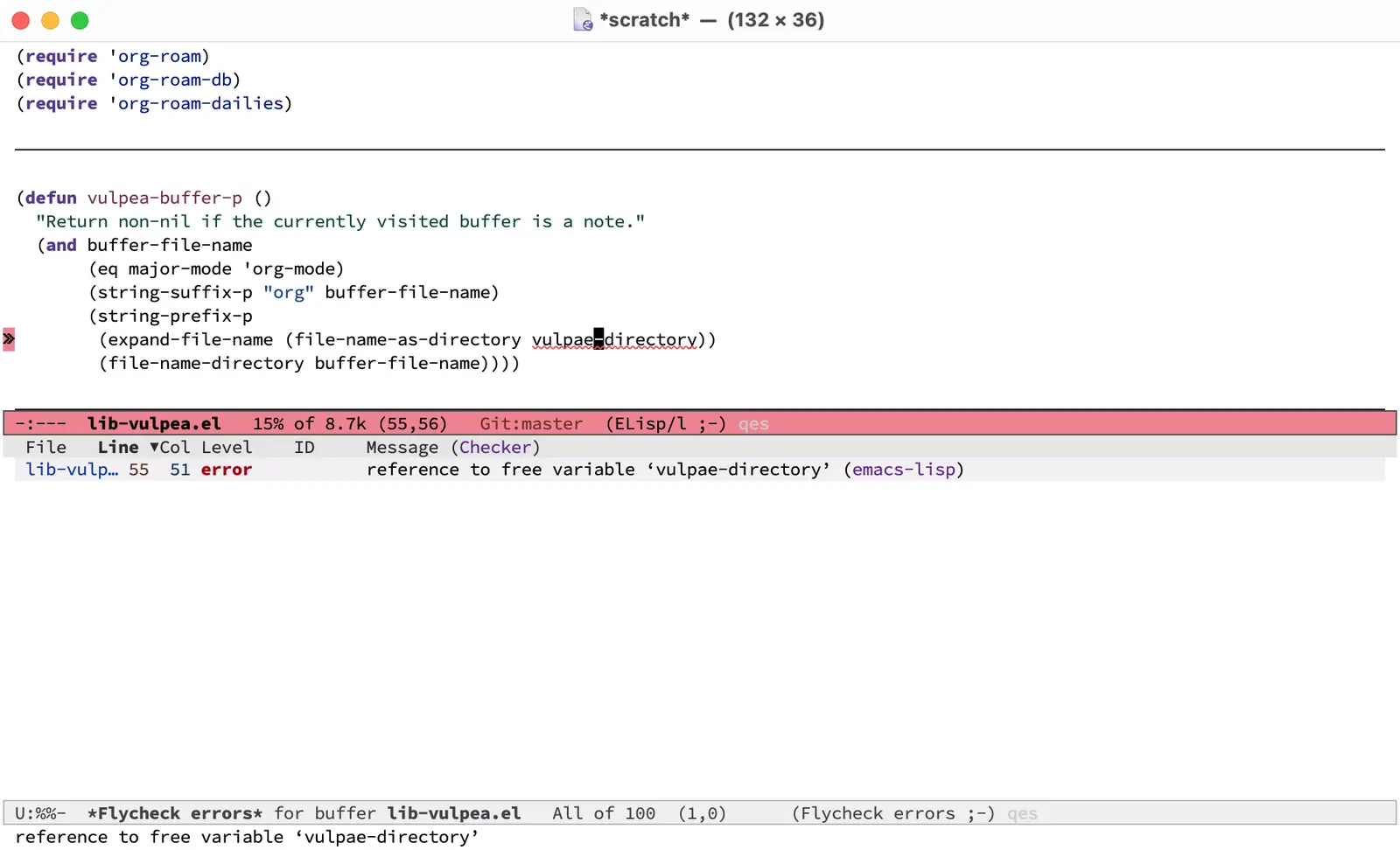
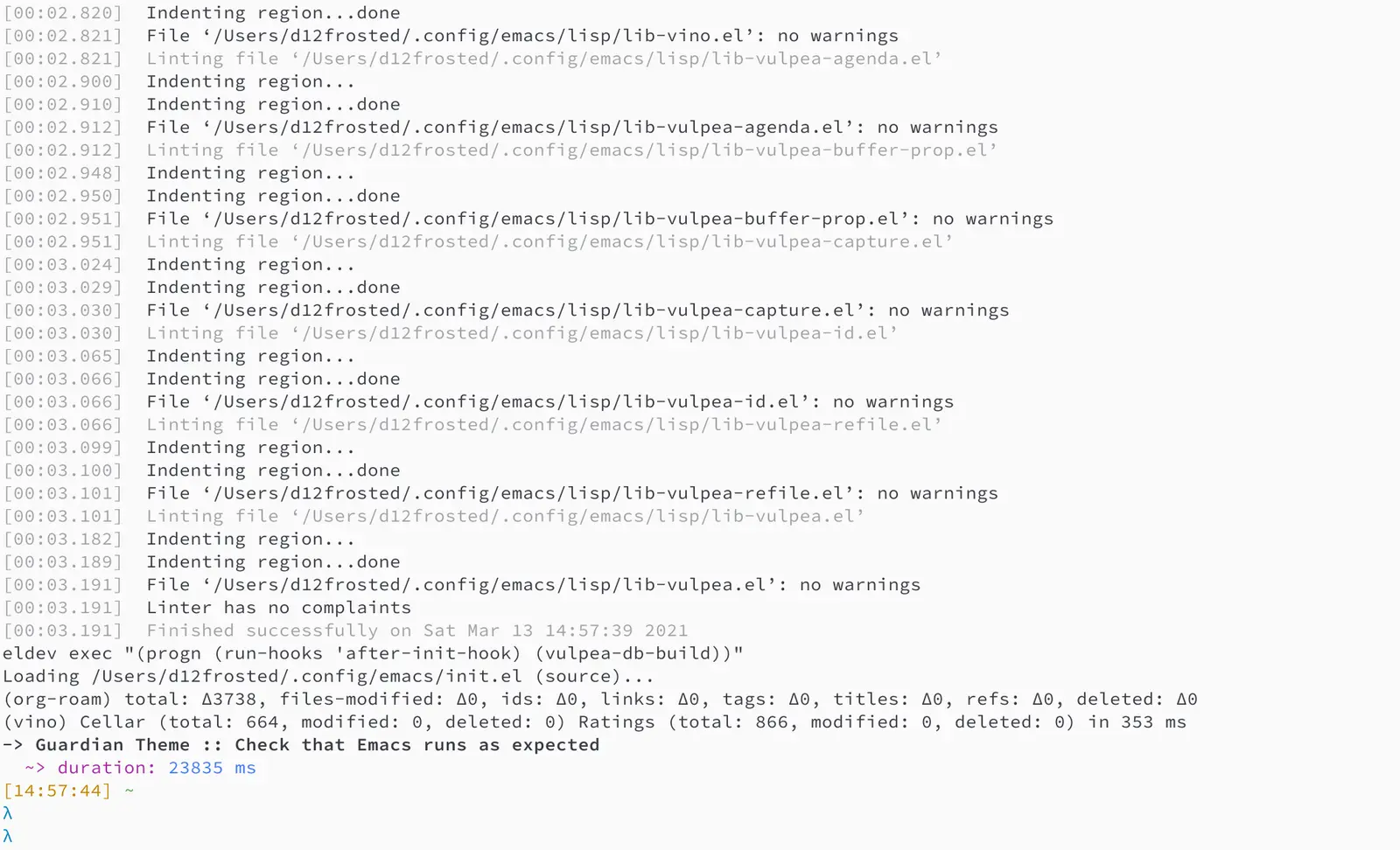
Before we dive into too much detail, let me describe the solution from a higher level.
- doublep/eldev is a project management tool because it's powerful and extensible.
- raxod502/straight.el is a package management tool because it's consistent and reliable.
- jwiegley/use-package is a package configuration tool with deferred loading because it's easy to use and widely adopted.
- gonewest818/elisp-lint is a linter because it aggregates many other linters.
- jorgenschaefer/emacs-buttercup is a testing framework because it's easy to use.
The structure of my .emacs.d looks like this:
.
├── Eldev
├── Makefile
├── README.org
├── early-init.el
├── init.el
├── lisp
│   ├── config-aaa.el
│   ├── config-bbb.el
│   ├── ...
│   ├── config-zzz.el
│   ├── init-autoloads.el
│   ├── init-elpa.el
│   ├── init-aaa.el
│   ├── init-bbb.el
│   ├── ...
│   ├── init-zzz.el
│   ├── lib-aaa.el
│   ├── lib-bbb.el
│   ├── ...
│   ├── lib-zzz.el
├── templates
│   ├── emacs-lisp-mode
│   │   ├── template_1
│   │   ├── ...
│   │   └── template_n
│   └── haskell-mode
│       ├── template_1
│       ├── ...
│       └── template_n
├── test
│   ├── lib-aaa-test.el
│   ├── lib-bbb-test.el
│   ├── ...
└── └── lib-zzz-test.el
As you can see, all Lisp files are located inside the lisp directory (you shouldn't put them on the same level as the init.el file, as that directory can't be part of load-path), and all tests are located inside the test directory.
The following naming convention is used.
init-xxxis a file lazily initializing thexxxfeature - it can be a programming language (e.g.init-haskell) or a feature (e.g.init-project)- this is the only file type describing which packages to install and how to initialise and configure them;
- it's safe to require these files, as they should defer any loading as much as possible;
lib-xxxis a file containing various utilities depending on packages defined ininit-xxxfile- these files are loaded via autoloads, and they should never be required directly;
- these files can safely
requireany packages defined ininit-xxxto help linter and byte compiler; - in some sense,
lib-xxxare packages that are not distributed via MELPA, but rather located inemacs.dfolder; - various extensions around
org-modecalledvulpeaare good examples oflibfiles:
config-xxxis a file containing variables and constants required by bothinit-xxxandlib-xxxfiles, allowing you to avoid circular dependencies;- as they don't load any packages, it's safe to require this file from any other file;
The only exception from this convention is init-autoloads.el file containing autoloads. Name comes from init.el file.
#1Content of early-init
See the relevant section in Emacs Help for more information on The Early Init File, introduced in Emacs 27.1. Basically, this file is great for frame customisations. In my case, I like to disable as much clutter as possible:
(add-to-list 'default-frame-alist '(tool-bar-lines . 0))
(add-to-list 'default-frame-alist '(menu-bar-lines . 0))
(add-to-list 'default-frame-alist '(vertical-scroll-bars))
This file is totally optional - you can safely omit it in your setup. But if you have any frame customisations, putting them in the early-init file might speed up your Emacs and fix some visual clutter upon startup.
#1Content of init.el
The goal of this file is to require all init-xxx files. The structure is trivial:
- Add
lispfolder toload-path, so we can userequire. - Adjust garbage collection thresholds, so things run smoother.
- Load
config-pathdeclaring various path constants. - Load
init-elpawhich 'bootstraps' your package and configuration management tools. - Load autoloads file.
- Load all other
init-xxxfiles. - Load
custom-file, even if you are not usingcustomizeinterface, you need this to use.dir-locals.el.
#2Add lisp directory to load-path
;; Since we might be running in CI or other environments, stick to
;; XDG_CONFIG_HOME value if possible.
(let ((emacs-home (if-let ((xdg (getenv "XDG_CONFIG_HOME")))
                      (expand-file-name "emacs/" xdg)
                    user-emacs-directory)))
  ;; Add Lisp directory to `load-path'.
  (add-to-list 'load-path (expand-file-name "lisp" emacs-home)))
#2Garbage collection thresholds
Garbage collection is a huge contributor to startup time. We temporarily increase this value to prevent garbage collection from running, then reset it to some big number in emacs-startup-hook. I discovered this trick thanks to hlissner/doom-emacs. But it is widely used by many people, for example purcell/emacs.d.
In addition it is a good idea to use emacsmirror/gcmh (aka Garbage Collector Magic Hack) to improve performance of interactive functions.
;; Adjust garbage collection thresholds during startup, and thereafter
(let ((normal-gc-cons-threshold (* 20 1024 1024))
      (init-gc-cons-threshold (* 128 1024 1024)))
  (setq gc-cons-threshold init-gc-cons-threshold)
  (add-hook 'emacs-startup-hook
            (lambda () (setq gc-cons-threshold
                             normal-gc-cons-threshold))))
#2Bootstrap
(require 'config-path)
(require 'init-elpa)
Literally, that's it. Check out the content of to find out how it works.
#2Set up custom-file location
Before we load anything, we should set up the location of our custom-file; otherwise, the Emacs customisation system will pollute our init.el file.
(setq custom-file (concat path-local-dir "custom.el"))
The constant path-local-dir is defined in config-path:
(defconst path-local-dir
  (concat
   (file-name-as-directory
    (or (getenv "XDG_CACHE_HOME")
        (concat path-home-dir ".cache")))
   "emacs/")
  "The root directory for local Emacs files.

Use this as permanent storage for files that are safe to share
across systems.")
#2Loading autoloads
;; load autoloads file
(unless elpa-bootstrap-p
  (unless (file-exists-p path-autoloads-file)
    (error "Autoloads file doesn't exist, please run '%s'"
           "eru install emacs"))
  (load path-autoloads-file nil 'nomessage))
The most important bit here is the last line, which loads file containing autoloads and errors out if it doesn't exist. We want to load this file before any other modules to make autoloaded functions available there. But of course we can't load this file during bootstrap process which generates this file.
#2Loading other init files
Now comes the easy part, we just load all init-xxx files that we have.
;; core
(require 'init-env)
(require 'init-kbd)
(require 'init-editor)
;; ...

;; utilities
(require 'init-selection)
(require 'init-project)
(require 'init-vcs)
(require 'init-ide)
(require 'init-vulpea)
(require 'init-vino)
(require 'init-pdf)
;; ...

;; languages
(require 'init-elisp)
(require 'init-haskell)
(require 'init-sh)
;; ...
While this might sound stupid to manually load files that has clear naming pattern, I still like to do it manually, because it helps byte compiler, it has less footprint on runtime performance, the list is not big and I rarely add new files. Another option would be to generate this list during 'compilation', but again, I would love to avoid any unnecessary complications.
#2Loading custom-file
And the last thing to do is to load custom-file:
;; I don't use `customize' interface, but .dir-locals.el put 'safe'
;; variables into `custom-file'. And to be honest, I hate to allow
;; them every time I restart Emacs.
(when (file-exists-p custom-file)
  (load custom-file nil 'nomessage))
#1Content of init-elpa
Part of our bootstrap process is setting up package management and package configuration tools, which is performed in init-elpa file.
#2Bootstrap straight.el
The bootstrap process of raxod502/straight.el is quite simple and well documented in the official repository. Additionally, we want to avoid any modification checks at startup by setting the value of straight-check-for-modifications to nil, so everything runs faster. We also want to install packages by default in use-package forms. And then everything is straightforward.
(require 'config-path)

(setq-default
 straight-repository-branch "develop"
 straight-check-for-modifications nil
 straight-use-package-by-default t
 straight-base-dir path-packages-dir)

(defvar bootstrap-version)
(let ((bootstrap-file
       (expand-file-name "straight/repos/straight.el/bootstrap.el"
                         path-packages-dir))
      (bootstrap-version 5))
  (unless (file-exists-p bootstrap-file)
    (with-current-buffer
        (url-retrieve-synchronously
         (concat "https://raw.githubusercontent.com/"
                 "raxod502/straight.el/"
                 "develop/install.el")
         'silent 'inhibit-cookies)
      (goto-char (point-max))
      (eval-print-last-sexp)))
  (load bootstrap-file nil 'nomessage))
The only bit I'm not describing here is how I configure retries for networking operations.
#2Set up use-package
Now it's easy to set up use-package:
(setq-default
 use-package-enable-imenu-support t)
(straight-use-package 'use-package)
#2Popular packages
There are packages (or rather libraries) that should be loaded eagerly because they are used extensively and they do not provide autoloads.
(use-package s)
(use-package dash)
#1Content of Eldev
Eldev file defines our project. You can read more about this file in doublep/eldev repository.
#2Specify project files
Eldev is quite powerful when it comes to fileset specification, but I find it not working properly with extra directories out of box. Since we can not place our lisp files in the same directory with init.el file, we configure eldev-main-fileset and add lisp folder to loading roots for certain commands.
(setf eldev-project-main-file "init.el"
      eldev-main-fileset '("init.el"
                           "early-init.el"
                           "lisp/*.el"))

;; Emacs doesn't allow to add directory containing init.el to load
;; path, so we have to put other Emacs Lisp files in directory. Help
;; Eldev commands to locate them.
(eldev-add-loading-roots 'build "lisp")
(eldev-add-loading-roots 'bootstrap "lisp")
#2Use MELPA
We're going to use certain third-party packages for project management (e.g. testing and linting), so we must tell Eldev where to load them from. This part is slightly confusing, as Eldev will install packages from MELPA, and for our configurations we're going to use straight.el. But Eldev isolates these packages in its working directory, and they won't interfere with our configurations. Ugly, but safe.
;; There are dependencies for testing and linting phases, they should
;; be installed by Eldev from MELPA and GNU ELPA (latter is enabled by
;; default).
(eldev-use-package-archive 'melpa)
#2Define bootstrap command
Bootstrapping Emacs is simple, we just need to load init.el file.
(defun elpa-bootstrap ()
  "Bootstrap personal configurations."
  (setq-default
   elpa-bootstrap-p t
   load-prefer-newer t)
  (eldev--inject-loading-roots 'bootstrap)
  (require 'config-path)
  (load (expand-file-name "init.el" path-emacs-dir)))

;; We want to run this before any build command. This is also needed
;; for `flyspell-eldev` to be aware of packages installed via
;; straight.el.
(add-hook 'eldev-build-system-hook #'elpa-bootstrap)
We set the value of elpa-bootstrap-p to t, so that autoloads file is not required from init.el (we are going to generate it during bootstrap flow). We also set load-prefer-newer to t so that Emacs prefers newer files instead of byte compiled (again, we are going to compile .el to .elc).
We hook this function into any build command in order to install packages and get proper load-path in all phases.
#2Define upgrade command
Upgrade flow is simple and uses straight.el functionality, because we use it to manage packages.
(defun elpa-upgrade ()
  "Bootstrap personal configurations."
  ;; make sure that bootstrap has completed
  (elpa-bootstrap)

  ;;  fetch all packages and then merge the latest version
  (straight-fetch-all)
  (straight-merge-all)

  ;; in case we pinned some versions, revert any unneccessary merge
  (straight-thaw-versions)

  ;; rebuild updated packages
  (delete-file (concat path-packages-dir "straight/build-cache.el"))
  (delete-directory (concat path-packages-dir "straight/build") 'recursive)
  (straight-check-all))

(add-hook 'eldev-upgrade-hook #'elpa-upgrade)
#2Define autoloads plugin
Now comes the dirtiest part - autoloads generation. Eldev provides a plugin for autoloads generation, but unfortunately it only works with the root directory. We need to generate our autoloads for files in the lisp directory, so we write our own plugin.
;; We want to generate autoloads file. This line simply loads few
;; helpers.
(eldev-use-plugin 'autoloads)

;; Eldev doesn't traverse extra loading roots, so we have to modify
;; autoloads plugin a little bit. Basically, this modification
;; achieves specific goal - generate autoloads from files located in
;; Lisp directory.
(eldev-defbuilder eldev-builder-autoloads (sources target)
  :type           many-to-one
  :short-name     "AUTOLOADS"
  :message        target
  :source-files   (:and "lisp/*.el" (:not ("lisp/*autoloads.el")))
  :targets        (lambda (_sources) "lisp/init-autoloads.el")
  :define-cleaner (eldev-cleaner-autoloads
                   "Delete the generated package autoloads files."
                   :default t)
  :collect        (":autoloads")
  ;; To make sure that `update-directory-autoloads' doesn't grab files it shouldn't,
  ;; override `directory-files' temporarily.
  (eldev-advised (#'directory-files
                  :around
                  (lambda (original directory &rest arguments)
                    (let ((files (apply original directory arguments)))
                      (if (file-equal-p directory eldev-project-dir)
                          (let (filtered)
                            (dolist (file files)
                              (when (eldev-any-p (file-equal-p file it) sources)
                                (push file filtered)))
                            (nreverse filtered))
                        files))))
    (let ((inhibit-message   t)
          (make-backup-files nil)
          (pkg-dir (expand-file-name "lisp/" eldev-project-dir)))
      (package-generate-autoloads (package-desc-name (eldev-package-descriptor)) pkg-dir)
      ;; Always load the generated file.  Maybe there are cases when we don't need that,
      ;; but most of the time we do.
      (eldev--load-autoloads-file (expand-file-name target eldev-project-dir)))))

;; Always load autoloads file.
(add-hook
 'eldev-build-system-hook
 (lambda ()
   (eldev--load-autoloads-file
    (expand-file-name "lisp/init-autoloads.el" eldev-project-dir))))
#2Linting configuration
And again, we need to tell Eldev which files to lint.
(defun eldev-lint-find-files-absolute (f &rest args)
  "Call F with ARGS and ensure that result is absolute paths."
  (seq-map (lambda (p)
             (expand-file-name p eldev-project-dir))
           (seq-filter (lambda (p)
                         (not (string-suffix-p "autoloads.el" p)))
                       (apply f args))))

(advice-add 'eldev-lint-find-files :around #'eldev-lint-find-files-absolute)
Then we ask Eldev to use gonewest818/elisp-lint for linting and configure it slightly.
;; Use elisp-lint by default
(setf eldev-lint-default '(elisp))
(with-eval-after-load 'elisp-lint
  (setf elisp-lint-ignored-validators '("byte-compile")))

;; Tell checkdoc not to demand two spaces after a period.
(setq sentence-end-double-space nil)
What I love about gonewest818/elisp-lint is that it combines multiple linters, including purcell/package-lint. Whilst package-lint is a useful linter, it enforces a naming convention which I don't agree with when it comes to Emacs configurations. For example, it wants every function in lib-vulpea.el to have a prefix lib-vulpea. Whilst in general this makes sense, I want to avoid the lib part here. The same goes for init and config stuff. So we intrusively change that rule:
;; In general, `package-lint' is useful. But package prefix naming
;; policy is not useful for personal configurations. So we chop
;; lib/init part from the package name.
;;
;; And `eval-after-load'. In general it's not a good idea to use it in
;; packages, but these are configurations.
(with-eval-after-load 'package-lint
  (defun package-lint--package-prefix-cleanup (f &rest args)
    "Call F with ARGS and cleanup it's result."
    (let ((r (apply f args)))
      (replace-regexp-in-string "\\(init\\|lib\\|config\\|compat\\)-?" "" r)))
  (advice-add 'package-lint--get-package-prefix :around #'package-lint--package-prefix-cleanup)

  (defun package-lint--check-eval-after-load ()
    "Do nothing."))
We also need eval-after-load, so let's just noop. It makes sense to discourage usage of eval-after-load in packages, but in Emacs configurations it doesn't make sense.
And the last bit is emacsql. I use emacsql-fix-vector-indentation to format my SQL statements, and I want linter to be happy about it:
;; Teach linter how to properly indent emacsql vectors.
(eldev-add-extra-dependencies 'lint 'emacsql)
(add-hook 'eldev-lint-hook
          (lambda ()
            (eldev-load-project-dependencies 'lint nil t)
            (require 'emacsql)
            (call-interactively #'emacsql-fix-vector-indentation)))
#1autoloads
Now that everything is configured, we can use eldev to bootstrap, compile, lint and test our configurations. The first thing we do is autoloads generation, which is as simple as
$ eldev build :autoloads
Though I prefer to clean autoloads before generating new ones.
$ eldev clean autoloads
$ eldev build :autoloads
This generates the lisp/init-autoloads.el file. And in case you were wondering about its content, it looks like this:
;;; init-autoloads.el --- automatically extracted autoloads  -*- lexical-binding: t -*-
;;
;;; Code:

(add-to-list 'load-path (directory-file-name
                         (or (file-name-directory #$) (car load-path))))


;;;### (autoloads nil "config-path" "config-path.el" (0 0 0 0))
;;; Generated autoloads from config-path.el

(register-definition-prefixes "config-path" '("path-"))

;;;***

;;; ...
;;; ...
;;; ...

;;;### (autoloads nil "lib-buffer" "lib-buffer.el" (0 0 0 0))
;;; Generated autoloads from lib-buffer.el

(autoload 'buffer-lines "lib-buffer" "\
Return lines of BUFFER-OR-NAME.

Each line is a string with properties. Trailing newline character
is not present.

\(fn BUFFER-OR-NAME)" nil nil)

(autoload 'buffer-lines-map "lib-buffer" "\
Call FN on each line of BUFFER-OR-NAME and return resulting list.

As opposed to `buffer-lines-each', this function accumulates
result.

Each line is a string with properties. Trailing newline character
is not present.

\(fn BUFFER-OR-NAME FN)" nil nil)

(function-put 'buffer-lines-map 'lisp-indent-function '1)

;; ...
;; ...
;; ...

;;;***

;;;### (autoloads nil "lib-vulpea-agenda" "lib-vulpea-agenda.el"
;;;;;;  (0 0 0 0))
;;; Generated autoloads from lib-vulpea-agenda.el

(autoload 'vulpea-agenda-main "lib-vulpea-agenda" "\
Show main `org-agenda' view." t nil)

(autoload 'vulpea-agenda-person "lib-vulpea-agenda" "\
Show main `org-agenda' view." t nil)

(defconst vulpea-agenda-cmd-refile '(tags "REFILE" ((org-agenda-overriding-header "To refile") (org-tags-match-list-sublevels nil))))

(defconst vulpea-agenda-cmd-today '(agenda "" ((org-agenda-span 'day) (org-agenda-skip-deadline-prewarning-if-scheduled t) (org-agenda-sorting-strategy '(habit-down time-up category-keep todo-state-down priority-down)))))

;;; ...
;;; ...
;;; ...

;;;***

;; Local Variables:
;; version-control: never
;; no-byte-compile: t
;; no-update-autoloads: t
;; coding: utf-8
;; End:
;;; init-autoloads.el ends here
As you can see, it uses autoload to define a symbol (function or variable) and where to load it from. It also sets up indentation based on declare from the body of the function. All constants are embedded as-is - they don't get autoloaded.
Please note that eldev commands need to be run with working directory pointing to the directory containing Eldev file, e.g. from $XDG_CONFIG_HOME/emacs or $HOME/.config/emacs.
#1Compiling
The second operation in the bootstrap process is byte compilation. It's said that byte-compiled Lisp executes faster, but there's also an experimental branch for native compilation called gccemacs, which is also available via emacs-plus. Another aspect of byte compilation is… well, compilation, which produces valuable warnings and errors. In our setup, it's very easy to compile all our .el files.
$ eldev clean elc
$ eldev compile
That's it.
#1Linting
The third step of the bootstrap process is linting. Once everything compiles, we just need to check what the linter has to say. Just to remind you, we're using gonewest818/elisp-lint. As you've probably figured, with Eldev this step is as trivial as
$ eldev lint
#1Testing
The last step of the bootstrap process is testing, which has two stages. First, we simply load our configurations and make sure that nothing errors out. Then we run test cases, for which we're using the jorgenschaefer/emacs-buttercup test framework. Interaction with Eldev is trivial, again.
$ eldev exec t
$ eldev test
Example of the test:
(require 'buttercup)

(describe "buffer-content"
  (it "returns an empty string in empty buffer"
    (let* ((current-buffer (current-buffer))
           (buffer (generate-new-buffer "test-buffer"))
           (name (buffer-name buffer)))
      ;; we can get content of the buffer by name
      (expect (buffer-content name) :to-equal "")

      ;; we can get content of the buffer by object
      (expect (buffer-content buffer) :to-equal "")

      ;; current buffer is not modified
      (expect (current-buffer) :to-equal current-buffer)))

  (it "returns content of non-empty buffer"
    (let* ((current-buffer (current-buffer))
           (buffer (generate-new-buffer "test-buffer"))
           (name (buffer-name buffer))
           (expected "hello\nmy dear\nfrodo\n"))
      (with-current-buffer buffer
        (insert expected))

      ;; we can get content of the buffer by name
      (expect (buffer-content name) :to-equal expected)

      ;; we can get content of the buffer by object
      (expect (buffer-content buffer) :to-equal expected)

      ;; current buffer is not modified
      (expect (current-buffer) :to-equal current-buffer))))
And the output of testing might look like this:
Running 2 specs.

buffer-content
  returns an empty string in empty buffer (27.47ms)
  returns content of non-empty buffer (0.38ms)

Ran 2 specs, 0 failed, in 37.85ms.
#1Upgrading
Since we explicitly defined an upgrade command in Eldev, we can execute it as any other command:
$ eldev upgrade
#1Makefile
Since certain operations consist of two steps (e.g. clean followed by build) and I also want to always pass extra arguments to eldev for verbosity and debuggability, I have a Makefile with all available commands.
.PHONY: clean
clean:
  eldev clean all

.PHONY: bootstrap
bootstrap:
  eldev clean autoloads
  eldev -C --unstable -a -dtT build :autoloads

.PHONY: upgrade
upgrade:
  eldev -C --unstable -a -dtT upgrade

.PHONY: compile
compile:
  eldev clean elc
  eldev -C --unstable -a -dtT compile

.PHONY: lint
lint:
  eldev -C --unstable -a -dtT lint

.PHONY: test
test:
  eldev exec t
  eldev -C --unstable -a -dtT test
#1org-roam
In addition, I like to build org-roam and vino databases during the bootstrap process, so I don't spend time on this when I'm using Emacs. For this, I've defined the following function in my lib-vulpea file.
;;;###autoload
(defun vulpea-db-build ()
  "Update notes database."
  (when (file-directory-p vulpea-directory)
    (org-roam-db-build-cache)))
Now we can evaluate this function from command line via eldev:
$ eldev exec "(vulpea-db-build)"
If you are using vino, then vulpea-db-build also triggers vino database update, but since it vino-setup happens in after-init-hook, we need to run it before executing vulpea-db-build.
(use-package vino
  ;; unrelated code
  :hook ((after-init . vino-setup))
  ;; unrelated code
  )
So we change our eldev command a little bit.
$ eldev exec "(progn (run-hooks 'after-init-hook) (vulpea-db-build))"
And we can put that into Makefile.
.PHONY: roam
roam:
  eldev exec "(progn (run-hooks 'after-init-hook) (vulpea-db-build))"
#1eru
The last, yet optional, bit of the whole puzzle is Eru, a script I use to set up and maintain my environment. I have it in my PATH, so I can rely on its might wherever I am. In short, I have the following commands:
$ eru install emacs # autoloads, compile, lint, roam
$ eru upgrade emacs
$ eru test emacs
Since Eru is a beast, you might not want to use it, but the core idea here is that you can create an executable that will glue all things together for you.
#!/usr/bin/env bash

set -e

ACTION=$1

emacs_d=$HOME/.config/emacs
if [[ -d "$XDG_CONFIG_HOME" ]]; then
  emacs_d="$XDG_CONFIG_HOME/emacs"
fi

function print_usage() {
  echo "Usage:
  emacs-eru ACTION

Actions:
  install               Install dependencies, compile and lint configurations
  upgrade               Upgrade dependencies
  test                  Test configurations
"
}

if [ -z "$ACTION" ]; then
  echo "No ACTION is provided"
  print_usage
  exit 1
fi

case "$ACTION" in
  install)
    cd "$emacs_d" && {
      make bootstrap compile lint roam
    }
    ;;

  upgrade)
    cd "$emacs_d" && {
      make upgrade compile lint
    }
    ;;

  test)
    cd "$emacs_d" && {
      make test
    }
    ;;

  *)
    echo "Unrecognized ACTION $ACTION"
    print_usage
    ;;
esac
For convenience, this script is available as a GitHub Gist, so you can download it, save in somewhere in your PATH, chmod it and use.
$ curl -o ~/.local/bin/emacs-eru https://gist.githubusercontent.com/d12frosted/b150fcaaf2de06b1b29af487ebbbf9c1/raw/6fc70215afce2472e4f289c2c8500fbfc9a3f001/emacs-eru
$ chmod +x ~/.local/bin/emacs-eru
#1What's next
Tinkering with Emacs, of course! This is an endless effort, a constant struggle, but most importantly, divine pleasure. On a serious note, I'd love to cover the most critical parts with tests and integrate emacs-elsa/Elsa into my flow. And I'd love to hear from you: how do you approach the safety problem of your emacs.d?
Safe travels!