Vulpea v2.4: unlinked mentions, schemas, and renaming
Everything in vulpea since v2.1 - the three roadmap features (unlinked mentions, schema validation, note renaming) plus a diagnostics command, a Doom module, bulk tag and metadata operations, and a security fix.
Back in February, the v2.1 post ended with a "what's next" list of three things for vulpea core: unlinked mentions, schema validation, and note renaming with link updating. All three have shipped. This post covers them, along with everything else that landed across v2.2, v2.3, and v2.4.
It's a lot of ground, so I've grouped it: the three roadmap features first, then bulk tag and metadata operations, then the tools for understanding a collection, then the smaller conveniences, and finally a security fix you should upgrade for.
#1The roadmap, delivered
Three features I promised in February. Here they are.
#2Unlinked mentions
This is the feature people ask for most often. Alright, I don't actually know about people - I just wanted it badly enough to build it. You write a note's title in plain text somewhere - in another note, in a journal entry - but never make it an id: link. The connection exists in your head and on the page, but not in the graph. Unlinked mentions surface those gaps.
Vulpea now finds them in both directions:
;; Incoming: notes that mention NOTE's title (or aliases) as plain
;; text, without an id: link to it.
(vulpea-note-unlinked-mentions-async
 note
 (lambda (hits)
   ;; each hit is a plist: (:note NOTE :path PATH :line LINE :context STR)
   (message "%d unlinked mentions" (length hits)))
 (lambda (err) (message "failed: %s" err)))

;; Outgoing: existing notes the current buffer mentions but doesn't
;; link to. Searches live buffer content, so unsaved edits count.
(vulpea-buffer-unlinked-mentions-async resolve reject)
The interesting part is what gets excluded. A naive title search produces noise: the note's own title in its own file, occurrences already inside a link, hits in #+title: keywords and property drawers (a note's own metadata, not prose), and hits in notes that happen to share a title (a title collision, not a mention). All of those are filtered out, so what you're left with is genuine prose that could be linked but isn't.
The scan uses ripgrep over vulpea-db-sync-directories, and the API is async and promise-style: it calls exactly one of resolve or reject, and returns the ripgrep process so a caller can wait on or cancel it. That shape plugs directly into a reactive UI - it's already wired up as a loader in vulpea-ui. You'll need rg on your exec-path; vulpea-doctor will tell you if it's missing.
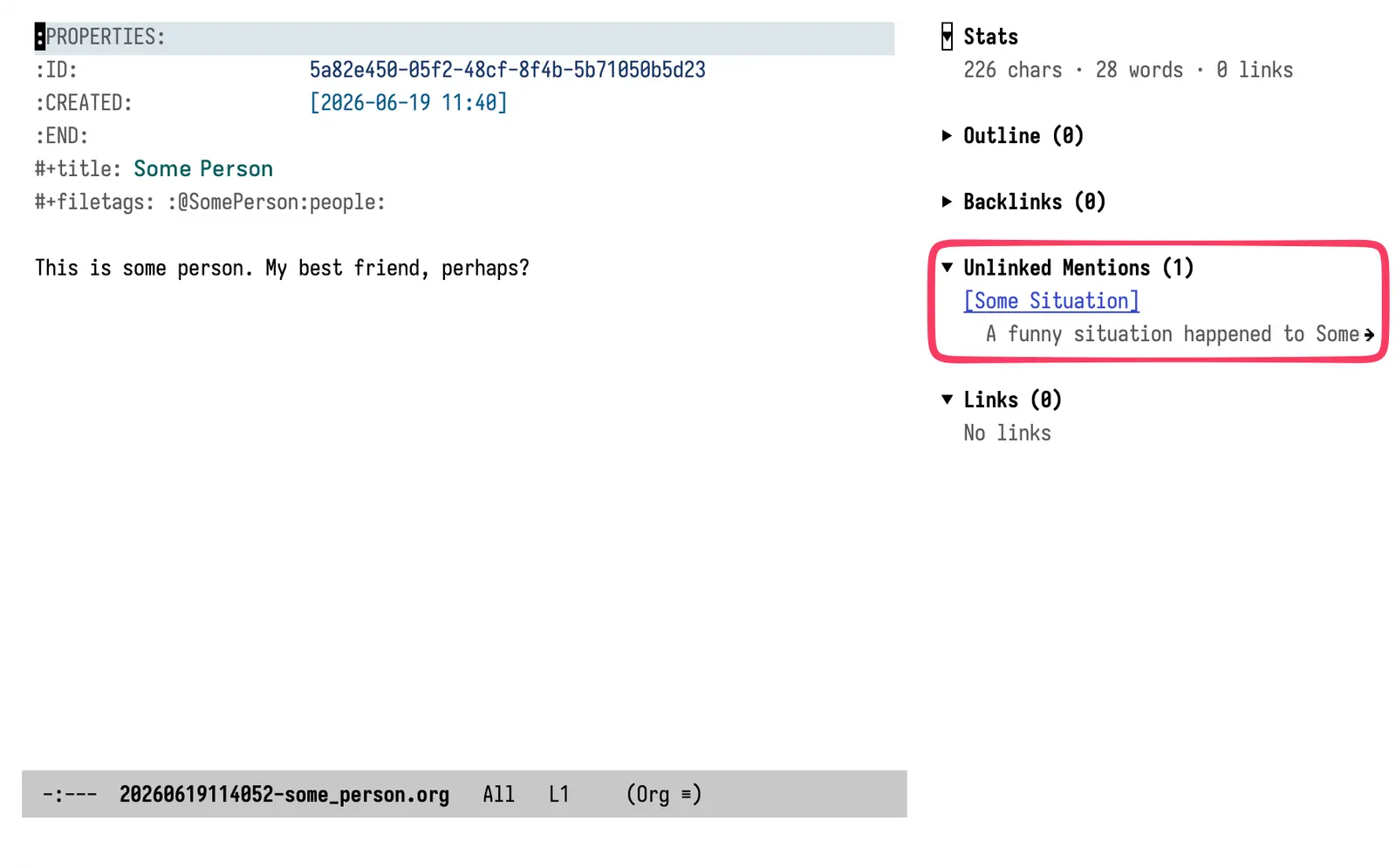
Here it is in vulpea-ui's sidebar: the Unlinked Mentions widget, surfacing a note that talks about "Some Person" in plain prose without ever linking to it. Fair warning - this part isn't fully done. The loader works and the widget renders, but the integration still needs polish before I'd call it finished. I expect it to land within the week.
#2Schema definition and validation
If you use notes as structured data - wines, people, projects, books - you have implicit expectations. A wine note should have a producer. A project should have a status. Until now those expectations lived only in your head, and a note missing a field just failed silently somewhere downstream.
Vulpea v2.4 lets you write them down. A schema is a predicate (which notes does this apply to?) plus a list of field specs (what should they carry?):
(vulpea-schema-define 'wine
  :predicate (lambda (note) (member "wine" (vulpea-note-tags note)))
  :fields
  '((:key "producer" :type note   :required t)
    (:key "name"     :type string :required t)
    (:key "colour"   :type symbol :required t :one-of (red white rose))
    (:key "grapes"   :type note   :multiple t)
    (:key "carbonation method" :type symbol
          :required (lambda (note)
                      (eq (vulpea-note-meta-get note "carbonation" 'symbol)
                          'sparkling)))))
Field types match the rest of vulpea's metadata vocabulary (string, number, symbol, note, link). Both :required and :one-of accept a function of the note, so you can express conditional rules and dependent enums - the carbonation field above is required only for sparkling wines, and you could just as easily make the allowed sweetness levels depend on the carbonation method.
Validation returns structured results, not a yes/no:
;; Validate every note the schema's predicate matches
(vulpea-schema-validate-all 'wine)
;; => (#s(vulpea-violation ...) ...)

;; Or validate a specific note / an arbitrary list
(vulpea-schema-validate note 'wine)
(vulpea-schema-validate-notes notes 'wine)
Each vulpea-violation records the note, the field, and a violation type: missing-required, wrong-type, invalid-reference (a note field pointing at a note that no longer exists), disallowed-value (not in the :one-of set), or invalid-value (rejected by a custom :validate function). That's enough to build a "notes that need attention" report, or to gate a publishing pipeline.
This feature has more depth than fits here - the conditional rules and the reference-checking in particular - so it's getting its own post. This is the tour.
#2Note renaming with link updating
Renaming a note has always been awkward: change the title, and every link that used the old title as its description is now stale. Vulpea v2.2 added a command that fixes this properly:
M-x vulpea-propagate-title-change
;; C-u M-x vulpea-propagate-title-change   ; dry-run: preview, change nothing
It determines the note from the current buffer (or prompts), offers to rename the file to match the new slug, updates the descriptions of incoming links that exactly matched the old title automatically, and shows you partial matches for manual review rather than guessing. The dry-run prefix lets you see the full blast radius before touching anything.
Two supporting pieces ship with it: vulpea-rename-file renames a note's file based on a new title slug and updates the database, and vulpea-title-change-detection-mode is a minor mode that notices when you've edited a title on save and reminds you to run the propagation command. This relies on link descriptions now being stored in the database (a v2.2 schema change), so finding stale descriptions no longer means reopening files.
#1Working with tags and metadata in bulk
v2.2 added first-class tag and metadata operations that work uniformly across file-level and heading-level notes.
;; Per-note tag operations
(vulpea-tags-add note "reading" "2026")
(vulpea-tags-remove note "draft")
(vulpea-tags-set note '("published"))

;; Batch operations across many notes
(vulpea-tags-batch-add notes "archive")
(vulpea-tags-batch-rename "todo" "task")   ; rename a tag everywhere

;; Same for metadata
(vulpea-meta-batch-set notes "status" "done")
(vulpea-meta-batch-remove notes "draft")
vulpea-tags-batch-rename is the one I reach for most: it renames a tag across the entire knowledge base in one call, and it's interactive with completion over existing tags. The batch metadata functions parse each file once instead of once per property, which matters when you're touching hundreds of notes.
v2.4 added hierarchical tag queries on top. If you define Org tag groups, vulpea-tags-expand turns a parent tag into the parent plus all its transitive members, so you can query a tag and everything under it:
(vulpea-db-query-by-tags-some (vulpea-tags-expand '("GTD")))
This is meaningful for the -some and -none queries; cyclic group definitions terminate safely.
#1Knowing your collection
A few tools for understanding the state of a large collection - and for diagnosing problems when something looks wrong.
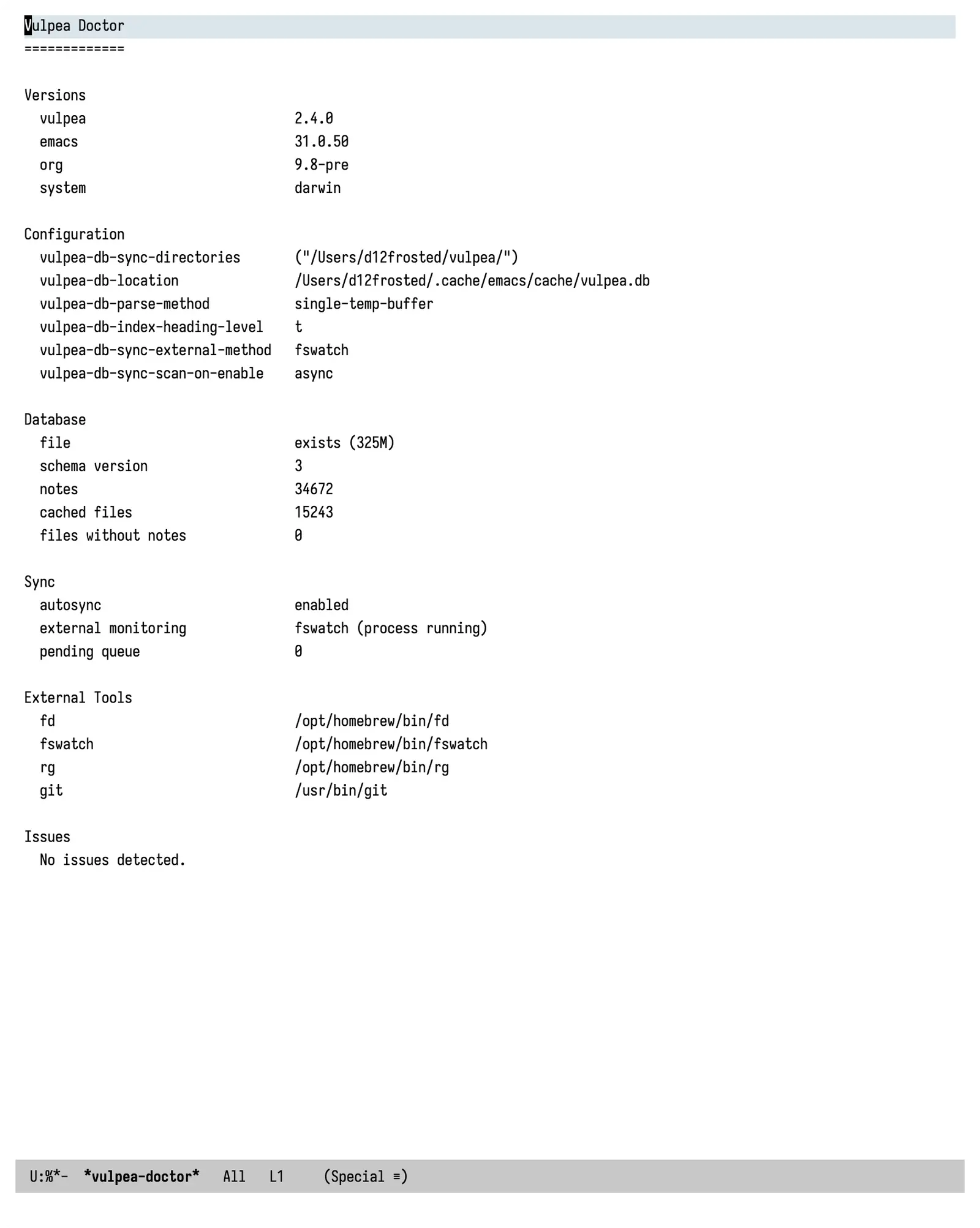
vulpea-doctor (v2.3) is the headline here. It's an interactive, read-only diagnostics command that reports versions, configuration, database state, sync state, and external tool availability in a single buffer, and flags the common setup problems: missing or empty sync directories, an empty database, fswatch / fd / rg not visible to Emacs (the usual PATH issue on GUI Emacs and Doom), autosync disabled, monitoring configured but not running. If you file a bug, paste its output.
M-x vulpea-doctor
M-x vulpea-version   ; precise version, incl. git describe or MELPA commit
For finding notes that need attention, v2.4 added stale-note detection:
;; Notes in files not modified in the last year, oldest first
(vulpea-db-query-stale-notes 365)
It uses the modification time recorded during sync and returns all notes in each stale file, ordered oldest first - which is exactly the order you want for a review-or-archive pass. This joins the graph-diagnostics functions from v2.1 (dead links, orphans, isolated notes, title collisions) into a reasonably complete toolkit for collection hygiene.
#1Smaller things worth knowing
A grab-bag of conveniences from across the three releases:
- Capture on empty.
vulpea-findandvulpea-insertnow take a:create-fn, with global defaults (vulpea-find-default-create-fn,vulpea-insert-default-create-fn). Point one atorg-captureand a search that finds nothing becomes note creation, inline. - Completion category. Note selection now reports a
vulpea-notecompletion category, so marginalia can annotate candidates, embark can offer note actions, and consult integrations can group or preview them. The change is additive - plaincompleting-readis unaffected. - Heading-level note creation.
vulpea-creategained:parentand:afterarguments for inserting a note as a heading under an existing note, with control over sibling order. Spacing around inserted headings is now deterministic. - Encrypted notes.
vulpea-db-extra-extensionslets vulpea track non-.orgfiles such as.org.ageand.org.gpg; they're parsed viafind-fileso decryption hooks run. Opt-in. - Doom module. There's a ready-made Doom module in the
doom/directory. Symlink it as:tools vulpeaand it installs vulpea, enables autosync, binds the commands underSPC n v, and addsdoom doctorchecks for thefswatch/fdPATHpitfall. - Quieter and smarter sync. Autosync now scans on enable by default, so external changes (git pulls, cloud sync) made while Emacs was closed are picked up without touching the files. Changing Org tag-inheritance settings between sessions triggers an automatic re-index. And
vulpea-db-sync-verbose(set it tonil) silences the routine "Syncing N files" messages on every save.
#1A security fix
v2.3 fixed a real one, worth calling out plainly. In vulpea-create templates, the %(elisp) and %<format> directives used to be expanded after values like ${title} were substituted in. So a value that happened to contain %(...) - and a note title can come from typed input, the active region, or vulpea-find / vulpea-insert - was evaluated as code.
The fix expands directives on the template itself before any values are substituted. Directives written by the template author keep working; substituted values are now always treated as literal data. If you create notes from titles that originate anywhere outside your own keyboard, upgrade for this.
#1Upgrading
Upgrading is simpler than it used to be. Since v2.2, the database rebuilds itself automatically when the schema version changes, and since v2.4 a parser-epoch mechanism re-extracts every file once when the extractor changes - including retroactively on first open of an older database. So in most cases you just update the package and let it re-index in the background.
If you ever want to force a clean rebuild anyway:
(vulpea-db-close)
(delete-file vulpea-db-location)
(vulpea-db-sync-full-scan)
If you're coming from org-roam or vulpea v1, see the migration guide.
#1What's next
With the v2.1 roadmap delivered, the core is more or less stable. I don't have a big list of features lined up, and honestly I think that's a good sign rather than a problem - the foundation does what I need it to do. vulpea-mcp, exposing the query layer to LLMs, is still something I keep the door open to, but I'm genuinely not sure it'll land. The next post is the schema deep-dive.
The more interesting frontier right now is on top of vulpea, not inside it. I just released vulpea-para: the PARA method built on vulpea, where a note's role comes from its tags rather than its folder, with a self-updating agenda, capture that files itself, and views for areas, projects, and people. It's the practical successor to my old org-roam task-management series, and the thinking behind it is in PARA, not GTD. A proper post about the package is coming.
And there's an itch I keep scratching: reading my notes when I'm away from Emacs. On the desktop I'm not leaving org mode, and I don't want to - it's where the writing happens. But I'm often on the go, and I just need a view into my notes from my phone. Nothing I've tried fits the way I work, so I've been toying with building a small mobile-friendly site for it, quite possibly on top of the vulpea-para views. It's exploratory, no promises - but it's where my attention is.
#1Thanks
Most of what's here started as a reported issue or a feature request: unlinked mentions (#210), the schema system (#213, #214), stale notes (#215), hierarchical tags (#146), capture on empty (#166), title propagation (#212), tag operations (#211), and the long diagnostics-and-caching thread (#277) that produced vulpea-doctor and several quiet correctness fixes. Thank you to everyone who took the time to write these up, reproduce them, and test the fixes.
The code is at github.com/d12frosted/vulpea. Available on MELPA. If you build something on top of it, I'd love to hear about it.