Task management with org-roam Vol. 7: Capture
Streamlining task capture in org-roam with dedicated inbox files per machine, processing via org-agenda, and dynamic capture templates that automatically place one-on-one meeting notes in the correct person's file.
Change Log
- [2025-11]: This series was written for vulpea v1 with org-roam. See Vulpea v2: breaking up with org-roam for context on vulpea v2, which no longer depends on org-roam. Updated guides are coming.
Capturing is one of the most important activities in the task management process. Previously, we discussed storing and querying tasks, and now it's time to cover capturing tasks, meeting notes, and inbox items.
Please note that the goal is not to discuss GTD or any other methodology, but rather to discover how org-roam combined with everything we've discussed previously can help you improve your capturing process regardless of the methodology you're using.
Related posts
Org Mode Capture lets you quickly store notes with zero interruption to your workflow. Capture is ridiculously powerful in Org Mode, as you can build so many things on top of it. For example, you can set up a full-blown journal with a simple template, automatically create TODO entries when capturing a link to a GitHub or Jira issue, etc.
;; you don't really need much, do you?
(setq org-capture-templates
      '(("j" "Journal entry" plain
         (file+olp+datetree "~/path/to/journal.org")
         "%K - %a\n%i\n%?\n"
         :unnarrowed t)))
Over the years of using Org Mode for task management, I've developed a habit of clearing my head of any actionable items and thoughts that I can't afford to spend time and cognitive resources on right now, thus significantly reducing my stress level. For some people, this allows them to maintain focus, and since my work involves constant context switching, it also helps me stay sane.
For this to work, any task management system must have the following properties.
- Capturing must be as fast as possible, which also implies ease of capturing.
- There must be a way to easily review all captured items and process them when you have time.
The speed and convenience of the capture process is straightforward to understand. If it takes more than a few seconds, it increasingly disturbs you from the current task at hand, meaning that you will stop capturing at some point. If you need to go to the 6th floor and unlock your precious planner from the safe in order to capture something, you will stop capturing.
In general, this means that it's totally fine to use a phone (even a non-org-based solution) or a piece of paper to write something down. You'll just have a few sources to process captured items from when you have time.
Due to the nature of the capture process, where you do it as fast as possible, these captured items might be… lacking a better description, located in the wrong place, irrelevant, or the beginning of something bigger. This is why it's important to process all captured items when you have time for that.
#1Inbox
When it comes to Org Mode, I prefer to have a dedicated inbox file per machine, so I can avoid sync issues as I might capture without an internet connection. I define my inbox file as follows:
(defvar vulpea-capture-inbox-file
  (format "inbox-%s.org" (system-name))
  "The path to the inbox file.

It is relative to `org-directory', unless it is absolute.")
Every inbox file has a title to distinguish between multiple inbox files and filetags that are inherited by all TODO entries in this file, so that I can quickly pull whatever I need to process. In my case, I'm using the REFILE tag.
:PROPERTIES:
:ID:                     d272271d-7585-4913-9445-d7d97b59295d
:END:
#+title: Inbox (personal)
#+filetags: REFILE
#1Capturing into inbox
For items to end up in the inbox file, I'm using a simple capture template for TODO entries. Since I want to avoid picking a template when I have more than one, I have a wrapper vulpea-capture-task function that picks up a specific template. There are other ways to achieve this - if you're interested, let me know.
(setq org-capture-templates
      '(("t" "todo" plain (file vulpea-capture-inbox-file)
         "* TODO %?\n%U\n" :clock-in t :clock-resume t)))

(defun vulpea-capture-task ()
  "Capture a task."
  (interactive)
  (org-capture nil "t"))
#1Processing inbox
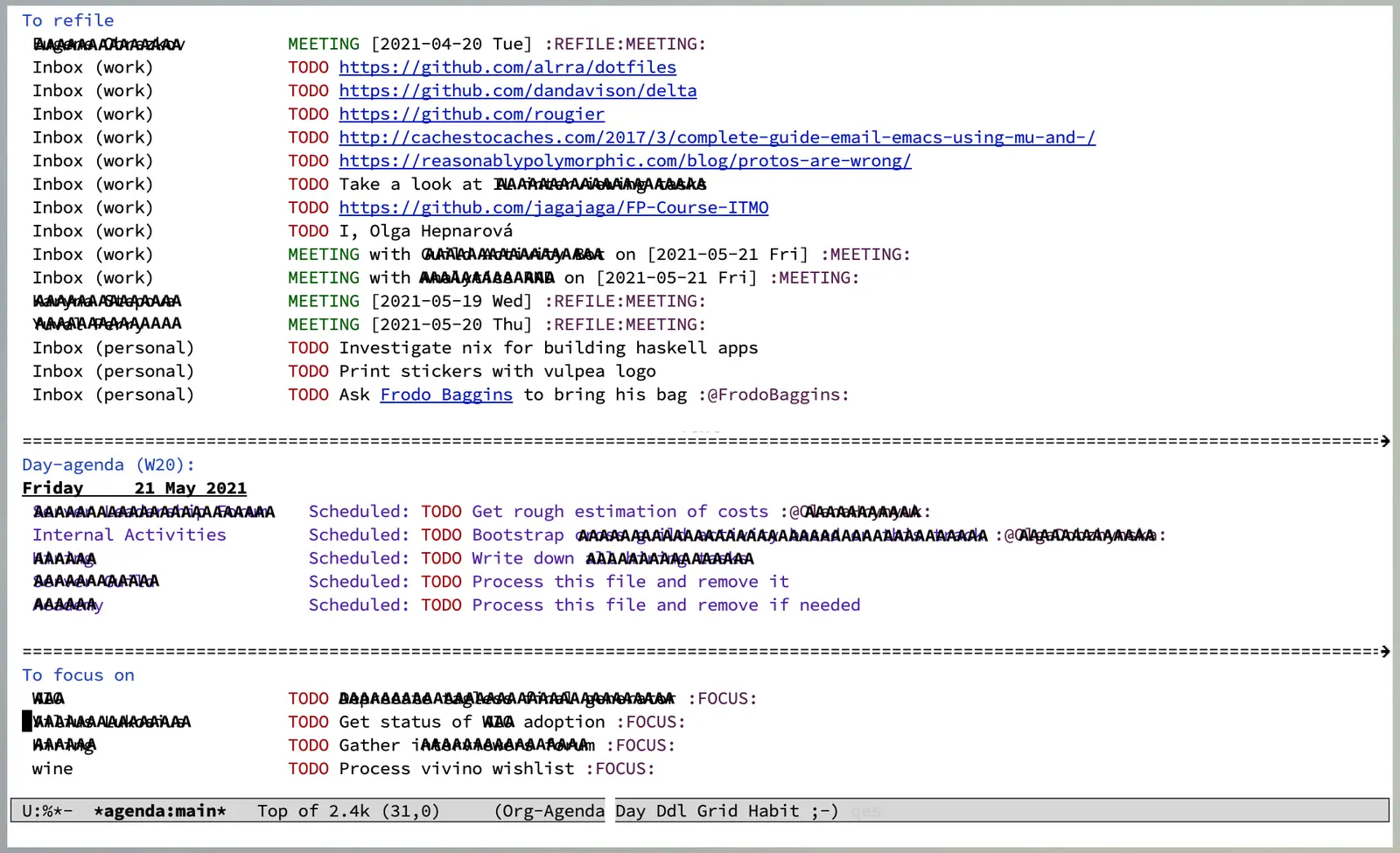
To process all inbox files managed by Org Mode, we have the wonderful org-agenda. My default agenda consists of various blocks, but the very first one lists all entries with the REFILE tag (thanks to filetags, all entries in inbox files are tagged accordingly).
(setq org-agenda-custom-commands
      '((" " "Agenda"
         ((tags
           "REFILE"
           ((org-agenda-overriding-header "To refile")
            (org-tags-match-list-sublevels nil)))))))
Now I can perform my routine on inbox entries: removing irrelevant entries, performing actions that can be done now, moving tasks to relevant projects, and processing meeting notes by producing more notes or tasks. The usual routine.
The agenda builds fast thanks to the trick described in Dynamic and fast agenda.
#1Dynamically selecting capture location
At this point, you might be wondering how this is related to Org Roam. After all, up to this point we haven't used any Org Roam features. And what is the core feature of Org Roam? In my opinion, it's fast query capabilities - this is something we've been using in almost every post in the series.
It's hard to come up with a generic example, and I hate examples from the void of someone's imagination, so let me describe where exactly in the capturing process I use it (apart from Automatic tagging). Hopefully, it's easy to adapt this idea for other use cases, and if you experience any troubles, don't hesitate to contact me.
Meeting notes. Whenever I'm in a meeting, I like to keep meeting notes (thanks to Org Mode, my memory can be ephemeral). I divide all meetings into two categories: one-on-ones (e.g. ) and meetings with multiple participants (e.g. ). In the end, all notes from one-on-ones are moved under the Meetings heading in the file related to the person I have a meeting with. Since this is so common, I decided to save myself from an unnecessary refile action by adapting my capture flow.
So when I have a meeting, I simply hit M-m c m (short for 'capture meeting', which calls the vulpea-capture-meeting function), select a person or type any other phrase (e.g. project name), and let the capture process place my notes in the right location. If I select a person, meeting notes will be located under the Meetings heading in the file dedicated to the selected person. If I type something else, my notes go straight to the inbox.
Person selection is possible by using vulpea-select from the vulpea library (the same as we did in Select a person and view related tasks). For my meeting notes related to a specific person to fall into my inbox, I tag them with the REFILE tag directly (unlike notes in the inbox file, which get the tag via inheritance).
The code is pretty straightforward and available on GitHub. First, we set up a new template which is responsible for capturing meeting notes. The cool part about the capture process in Org Mode is that you can use functions to determine capture location and capture body, so this is what we're using here - vulpea-capture-meeting-target and vulpea-capture-meeting-template.
(setq org-capture-templates
      '(("t" "todo" plain (file vulpea-capture-inbox-file)
         "* TODO %?\n%U\n" :clock-in t :clock-resume t)

        ("m" "Meeting" entry
         (function vulpea-capture-meeting-target)
         (function vulpea-capture-meeting-template)
         :clock-in t
         :clock-resume t)))

(defun vulpea-capture-meeting ()
  "Capture a meeting."
  (interactive)
  (org-capture nil "m"))
Interestingly, these functions are called in the following order:
vulpea-capture-meeting-templatevulpea-capture-meeting-target
This means that we need to present a list of people in the template phase and then access it somehow in the target phase. Fortunately, there is an API in the capture process that allows us to store extra information for the duration of the capture process - org-capture-put and org-capture-get.
(defun vulpea-capture-meeting-template ()
  "Return a template for a meeting capture."
  (let ((person (vulpea-select
                 "Person"
                 :filter-fn
                 (lambda (note)
                   (let ((tags (vulpea-note-tags note)))
                     (seq-contains-p tags "people"))))))
    (org-capture-put :meeting-person person)
    (if (vulpea-note-id person)
        "* MEETING [%<%Y-%m-%d %a>] :REFILE:MEETING:\n%U\n\n%?"
      (concat "* MEETING with "
              (vulpea-note-title person)
              " on [%<%Y-%m-%d %a>] :MEETING:\n%U\n\n%?"))))
First, we select a person via vulpea-select and store it via org-capture-put, so we can access it in the vulpea-capture-meeting-target function. vulpea-select always returns a note, but if the result doesn't contain an id, it means that the note doesn't exist. In our case, this means that we want to place meeting notes in the inbox file, and the heading must contain the name of the group we're having a meeting with. If it's a real person, there's no need to add the name to the heading, but we need an extra tag - REFILE - so the Inbox agenda picks it up.
(defun vulpea-capture-meeting-target ()
  "Return a target for a meeting capture."
  (let ((person (org-capture-get :meeting-person)))
    ;; unfortunately, I could not find a way to reuse
    ;; `org-capture-set-target-location'
    (if (vulpea-note-id person)
        (let ((path (vulpea-note-path person))
              (headline "Meetings"))
          (set-buffer (org-capture-target-buffer path))
          ;; Org expects the target file to be in Org mode, otherwise
          ;; it throws an error. However, the default notes files
          ;; should work out of the box. In this case, we switch it to
          ;; Org mode.
          (unless (derived-mode-p 'org-mode)
            (org-display-warning
             (format
              "Capture requirement: switching buffer %S to Org mode"
              (current-buffer)))
            (org-mode))
          (org-capture-put-target-region-and-position)
          (widen)
          (goto-char (point-min))
          (if (re-search-forward
               (format org-complex-heading-regexp-format
                       (regexp-quote headline))
               nil t)
              (beginning-of-line)
            (goto-char (point-max))
            (unless (bolp) (insert "\n"))
            (insert "* " headline "\n")
            (beginning-of-line 0)))
      (let ((path vulpea-capture-inbox-file))
        (set-buffer (org-capture-target-buffer path))
        (org-capture-put-target-region-and-position)
        (widen)))))
Now it becomes slightly more verbose, but this code is actually dead simple. It's borrowed from org-capture-set-target-location, and unfortunately, I couldn't find a way to properly reuse it.
First, we get the person note that we selected in vulpea-capture-meeting-template via org-capture-get, and if it has an ID, that means we need to place the note under the Meetings heading; otherwise, it just goes straight to vulpea-capture-inbox-file.
That's it!
#1References
- Org Mode Capture
- Org Mode Tag Inheritance
- lib-vulpea-capture - personal configurations for Org capture process